Friday, May 22, 2026

Passkey-only Yubikeys now available for purchase

What's changing

You can now purchase a USB-A or USB-C compatible Yubikey that exclusively supports Passkeys (ie it does not support OTP) for only $29 by requesting one from https://lbl.freshservice.com/support/catalog/items/93

Why it’s important

If you are currently using an older Yubikey for OTP MFA that only supports U2F, you may run into issues trying to use a hardware security key to store a Passkey. The new dedicated Passkey Yubikey ensures compatibility and allows you to take advantage of the latest FIDO2 security standard.

Getting started

For direct assistance, you can also contact the IT Help Desk via chat at https://go.lbl.gov/itchat.


Friday, April 10, 2026

Passkeys Lab-Wide Rollout Launch Starts in Operations


What’s changing
Following a successful three-month pilot, Berkeley Lab is officially beginning a Lab-wide rollout of passkeys to modernize our authentication infrastructure. This transition will occur in phases: all Operations divisions will begin enrollment in April 2026, followed by all Research divisions in May 2026. While staff are already familiar with the security benefits of passkeys, this formal rollout marks the transition from an optional pilot to a Lab-wide standard, ensuring that every user has access to this faster, more secure login method.

https://it.lbl.gov/passkeys-lab-wide-rollout-launch-starts-in-operations/

Why it’s important

The primary goal of this rollout is to establish a more robust and efficient authentication standard. Passkeys replace the manual entry of secondary one-time codes (OTP) with a cryptographic check tied directly to your device. By shifting the Lab toward this standard, we are reducing the risk of credential theft and phishing. During this transition period, all existing authentication methods—including physical tokens and 6-digit authenticator codes—will remain fully functional to ensure no disruption to your workflow.

Getting started

  • Operations Divisions: Rollout begins in April 13, 2026.

  • Research Divisions: Rollout begins in May 2026.

  • Staff: When your division is enrolled, you will see an optional prompt to register your first passkey during your next login attempt.

  • Early Access & Resources: If you would like to join the program ahead of your division's rollout, or if you need access to registration walkthroughs and FAQs, please visit https://go.lbl.gov/passkeys.

For direct assistance, you can also contact the IT Help Desk via chat at https://go.lbl.gov/itchat.

Wednesday, December 17, 2025

New authentication options when using passkeys


What’s changing
We’re adding the ability to use your authenticator app’s one-time password (OTP) even if you have already created a passkey. Previously, when a passkey was set up, it often became the primary or exclusive prompt for authentication.
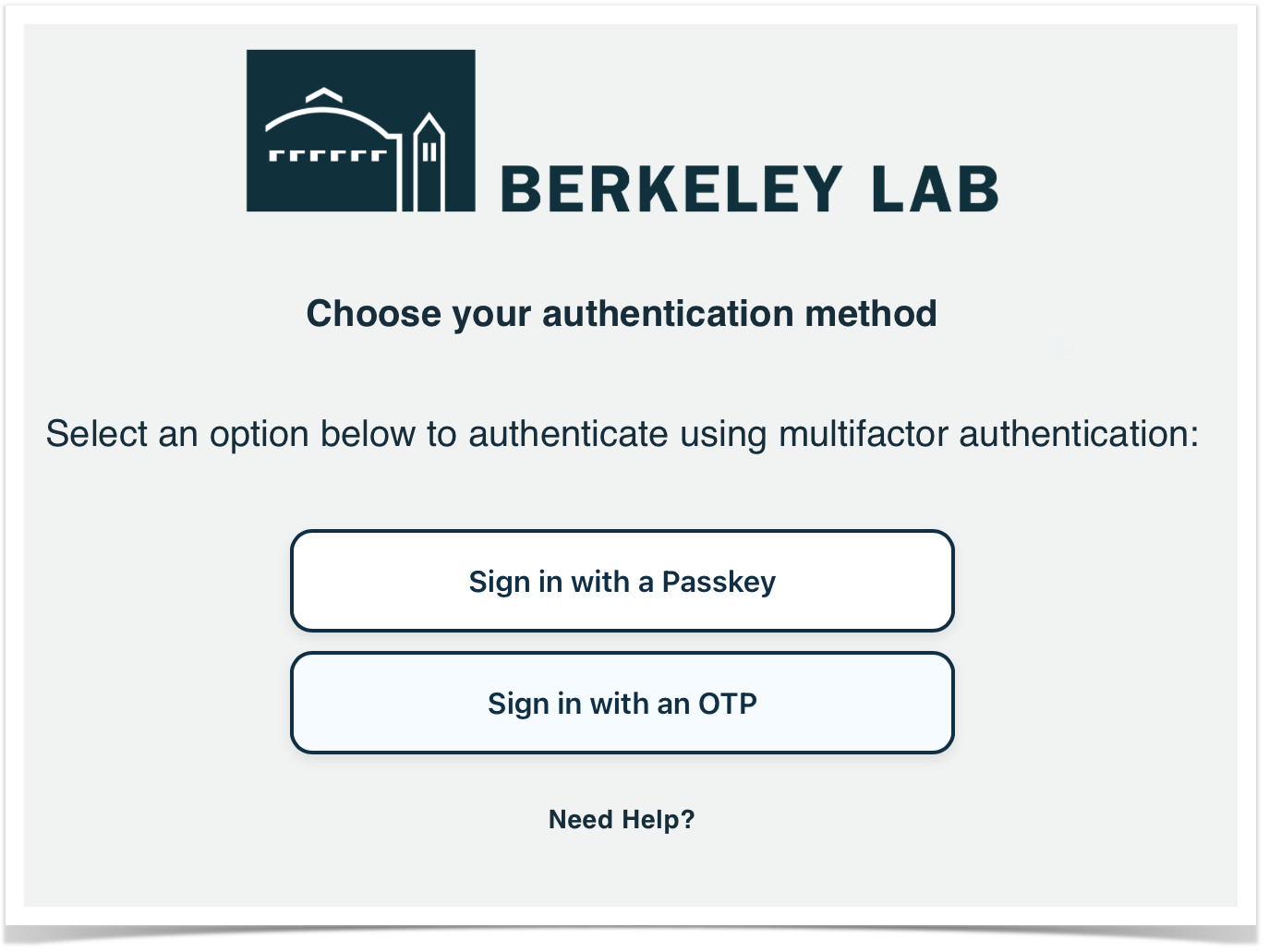
Now, if you are prompted for a passkey but cannot use it, you can cancel the request and select “Sign in with an OTP” to complete the login process using your authentication app or a physical security key (like a Yubikey).

Why it’s important
While passkeys provide a more secure and seamless sign-in experience, there are certain scenarios where having a flexible fallback is necessary:

  • New or unsupported devices: If you are accessing your account on a new device where your passkey hasn’t been synchronized yet, or if you don’t have immediate access to your passkey-enabled device.
  • System limitations: Certain environments, such as some Remote Desktop configurations, do not currently support passkey redirection. This update ensures you can still sign in securely using an OTP in these specific technical environments.

Getting started

  • To use this feature, when prompted for a passkey, click Cancel on the passkey system dialog and then select Sign in with an OTP on the sign-in screen.


Revised workflow for creating your first passkey

What’s changing

We are updating the setup process for users creating their first passkey. Now, the system will specifically prompt users to create their initial passkey on a mobile device or a physical security key (such as a Yubikey).
Previously, users could create their first passkey on the local storage of a specific computer. However, this often meant the passkey was restricted to that single device, causing authentication issues when the user attempted to sign in from a different location.
The new workflow guides users toward more portable options, such as mobile devices, which can then be used to authenticate on other computers via a QR code.

Why it’s important

This change is based on feedback from users who found themselves "locked out" of the passkey experience when their first credential was stored on a non-synced or inaccessible desktop device. By encouraging the first passkey to be created on a mobile device or security key, we ensure that:

  • Portability: Users can authenticate across multiple devices using the "Sign in with another device" QR code flow or with a security key.
  • Reliability: The risk of losing access to an account due to a device-specific local passkey is significantly reduced.
  • Streamlined Onboarding: New users are guided toward the most flexible and robust authentication method from the start.

Getting started

  • When prompted to "Create a passkey" for the first time, follow the on-screen instructions to register your mobile device or security key.  

Resources


Friday, December 12, 2025

Passkey Pilot is open to early adopters

What’s changing

IT is officially opening the Passkey Pilot Program to all interested early adopters. We are inviting users to help us test this platform as we prepare for a broader rollout across the Lab in 2026.

Why it’s important

Passkeys are a modern, phishing-resistant alternative to traditional passwords and Multi-Factor Authentication (MFA). They provide a simpler and more secure sign-in experience by leveraging the biometric sensors or security keys you already use.

By joining the pilot, your participation will provide valuable feedback that helps us improve this new service, ensuring a seamless experience for all users when the program expands next year.

Getting started

  • No labels