Purpose of Knowledge Article:
- Use this article to save your MFA tokens directly to your phone
- For Android and iOS
- Save your tokens this way to avoid losing access to your MFA tokens
- Lab IT does not recommend linking LBNL token to a cloud backup
Resolution:
| 1 | Open the Google Authenticator app on your iPhone |
no image |
| 2 | Tap on your profile icon in the top right corner |
|
| 3 | Tap on the selection that reads 'Use Authenticator without an account' |
|
| 4 | When prompted, tap Continue |
|
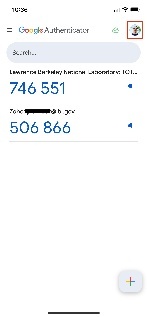


| 1 | Open the Google Authenticator app on your iPhone |
no image |
| 2 | Tap on your profile icon in the top right corner |
No Image |
| 3 | Tap on the selection for 'Use without an account' |
No Image |
| 4 | When prompted, tap Continue |
No Image |
