This is a guide for how to sign in and sign out to Microsoft Office
This guide provides instructions for both Windows and Mac
Resolution
You must have a Microsoft Office license subscription. If you do not have one, go to https://software.lbl.gov/ to purchase one
You must wait for your approver (usually your supervisor to approve) and then the Software and License team will assign you a license. Once completed, you will be notified via email
Contacting the Lab IT Support Services team does not help speed up the process as we are not part of the process
1
Open up Microsoft Office Word
no image
2
Select File
3
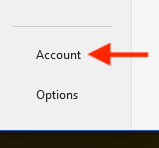
Select Account or (Office Account)
4
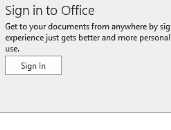
Select Sign In and sign in using your LBNL account credential
5
Exit all Microsoft Office software and reopen it
Note: sometimes restarting the computer is required
no image
1
Open up Microsoft Office Word
no image
2
Select Sign In in the top left corner
3
Select Sign In and sign in using your LBNL account credential
4
Exit all Microsoft Office software and reopen it
Note: sometimes restarting the computer is required
no image
1
Open up Microsoft Office Word
2
Select File
3
Select Account or (Office Account)
4
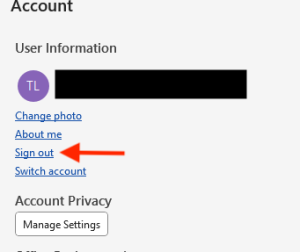
Select Sign Out
5
Exit all Microsoft Office software
Note: if you are troubleshooting, restart the computer as well
no image
1
Open up Microsoft Office Word
no image
2
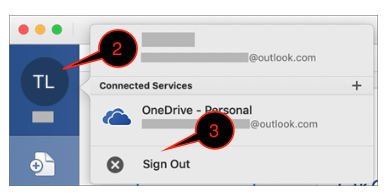
Select the icon with your name initial in the top left corner
3
Select Sign Out
4
Exit all Microsoft Office software (make sure the software is not running on the dock)
Note: if you are troubleshooting, restart the computer as well