
...
Date: Wed, 10 Feb 2010 16:48:37 -0800
Subject: Carbonite Key Management and eDiscovery
From: James Welcher <[email protected]>
To: customersupport@carbonite.comCarbonite comCarbonite Support,
I have a question about the ability to perform institutional eDiscovery on our customers using Carbonite onsite. I see from your Privacy Policy (http://www.carbonite.com/privacy) that you have the ability to decrypt data if required by law or for trouble-shooting:
Carbonite will not decrypt your files unless i) it reasonably believes that it must do so to troubleshoot problems with the Carbonite Products or Services or ii) it reasonably believes it must do so in order to comply with a law, subpoena, warrant, order, or a certification requirement, such as the requirements of 18 U.S.C. § 2703.
Question 1:
Does this mean that the encryption key (Carbonite-Encryption-Key.pem) is itself not encrypted? I guess I assumed that the user's password was used to encrypt the encryption key. If the encryption key *IS* encrypted, does this mean that you are encrypting the backup data with multiple keys (along the lines of a PGP message encrypted for multiple recipients?) so that you can later decrypt it when needed?Question 2:
However you have access, clearly, Carbonite does have the ability to decrypt users data when required by law. As an Institution purchasing a set of licenses for it's employees, do we have the ability to decrypt customer data, again, when required by law or company policy? i.e. how can we perform our own eDiscovery?Question 3:
Assuming that I have a PC platform and I am doing my OWN key management... this means that you can no longer perform a password reset, correct?Thank you for your time.
--
James Welcher <[email protected]> 1.510.486.5543
Cyber Security, IT Division
Lawrence Berkeley National Laboratory - http://www.lbl.gov
Restores, et. al.
- EXTERNAL DRIVES: not included, neither are other partitions of same disk
- Mac: Multi-user computer: non-admin user not able to restore even their own files (Bad)
- Mac: Multi-user computer: users are unable to browse other users files through "Restore" interface (Good!)
- Mac: Multi-user computer: admin users are unable to restore non-admin users files (Bad? To do a restore, you'll need the user to log in first, then an admin to "authorize" the restore.)
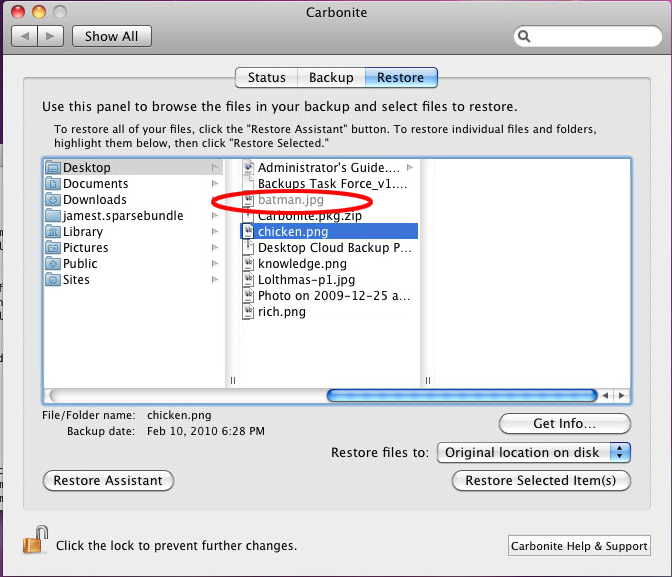
- Mac: File-Vault complications (how exactly does this software work with File Vault? Was able to restore an individual file, not from a /band/. What does Remote File Access show? When I dragged a file to the trash, it was "grayed out" from restore selection and I couldn't select it for restore)
References
- Carbonite's "Managing your own Encryption Key" Document: http://cp-carbonite.kb.net/display/4n/kb/article.aspx?aid=1060
- Carbonite's "Privacy Policy" Document: http://www.carbonite.com/privacy/
